


Burnish Editorial
How to get your Shopify products into ChatGPT (November 2026)
You do not need an app. Four requirements decide whether Shopify shares your products with ChatGPT. Here is how to check, and what four AI assistants told us.
Last updated November 23, 2026
In this article
Documents
What four AI assistants told us
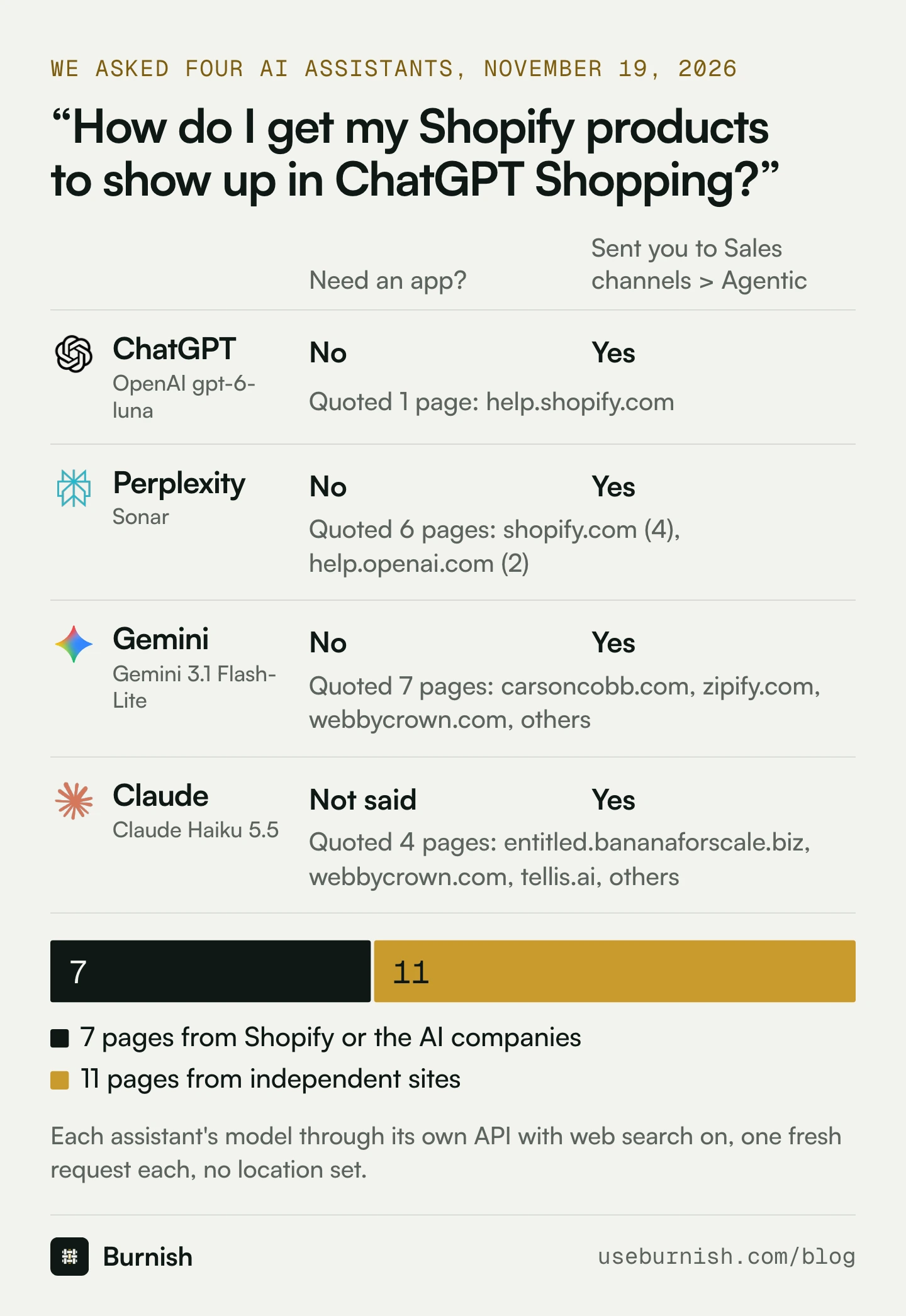
“How do I get my Shopify products to show up in ChatGPT Shopping?”
| Assistant | Need an app? | Sent you to Sales channels > Agentic | Pages it quoted |
|---|---|---|---|
| ChatGPTOpenAI gpt-6-luna | No | Yes | 1 page: help.shopify.com |
| PerplexitySonar | No | Yes | 6 pages: shopify.com (4), help.openai.com (2) |
| GeminiGemini 3.1 Flash-Lite | No | Yes | 7 pages: carsoncobb.com, zipify.com, webbycrown.com, others |
| ClaudeClaude Haiku 5.5 | Not said | Yes | 4 pages: entitled.bananaforscale.biz, webbycrown.com, tellis.ai, others |
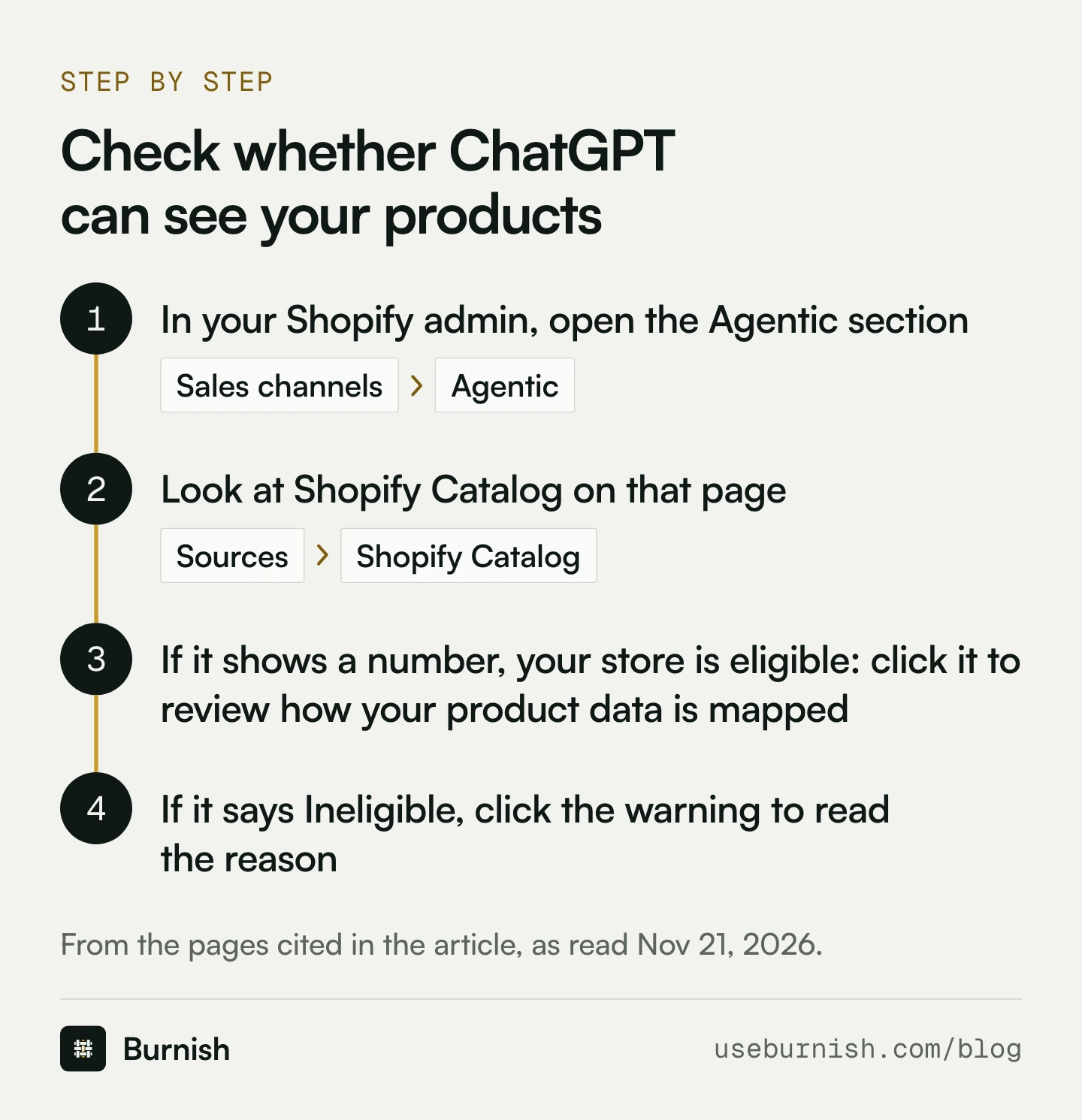
How do I check whether ChatGPT can see my products?
Open your Shopify admin and go to Sales channels > Agentic. Shopify says ChatGPT is active by default for eligible stores, and there is no separate ChatGPT sales channel to install. You will not find it in your list of installed sales channels; it only appears in the Agentic section.
Look at Sources > Shopify Catalog on that page. One of two things shows:
- A number. Your store is eligible, and that is how many of your products sit in Shopify Catalog. Click it to review how your product data is mapped.
- Ineligible. Click the warning to read the reason. Shopify keeps a list of reasons and what you can do about each one.
If ChatGPT is listed and Shopify Catalog access is on, you are done with the setup part. Everything after this is about being chosen, not being included.
What does Shopify require before ChatGPT shows my products?
Four things, all from Shopify’s own requirements page for ChatGPT:
- You sell to customers in the United States. Your store can be based anywhere.
- Your store and products are eligible for Shopify Catalog. Shopify’s Catalog requirements page lists a plan of Starter or higher and a storefront without a password. Products sold only to business or wholesale buyers, or behind a customer login, are left out automatically.
- You accept the Agentic Storefronts Supplemental Terms of Service.
- Your Terms of service, Privacy policy, and Return and refund policy are filled in under Settings > Policies.
The fourth one is the easiest to miss on a new store. If any of the three policies is blank, you do not meet Shopify’s requirements.
Which product details does ChatGPT actually read?
Shopify Catalog sends each product’s title, description, options, images, price, availability and other key attributes, and keeps price and stock up to date. OpenAI says that when ChatGPT picks which products to show, it considers structured details like price and product description, and other third-party content about the product.
So the fields you control matter most:
- Titles that say what the thing is. “Linen duvet cover, queen, sage” beats “The Willow.”
- Descriptions that answer buyer questions in plain sentences: material, size, who it is for, care.
- Legal disclosures in the first 6,000 characters of the description. Shopify asks for this explicitly.
- Custom data mapped. If your real titles or descriptions live in metafields or tags, use the Channel mapping page so Catalog sends the right text. You can also group separate products that are really variants into one listing there.
What should I not pay for?
Shopify now does these three things for you, for free:
- A ChatGPT product feed. Shopify says you do not need to build or maintain one. Catalog already sends your eligible products.
- An llms.txt generator. Every Shopify store now serves /agents.md, /llms.txt and /llms-full.txt automatically. Shopify’s words: you do not need a third-party app to generate these files.
- An app to “connect” ChatGPT. The ChatGPT Business app is optional. It claims your business profile; it does not put your products in ChatGPT.
Why is my competitor recommended and I am not?
Inclusion and recommendation are different steps. Catalog makes your products available; ChatGPT then picks what fits each question. OpenAI is plain that not every available product will be shown.
The only honest way to know where you stand is to ask the questions your buyers ask, the way they ask them, and write down which stores come back. Do it in ChatGPT, Perplexity and Gemini, because they read different pages: in our panel above, ChatGPT quoted Shopify’s own Help Center while Gemini and Claude quoted only independent sites. Repeat it every few weeks; answers move.
When a competitor is named and you are not, compare the two product pages field by field. Look for a vague title, a thin description, or no outside page that mentions the product at all.
How to check this in Burnish
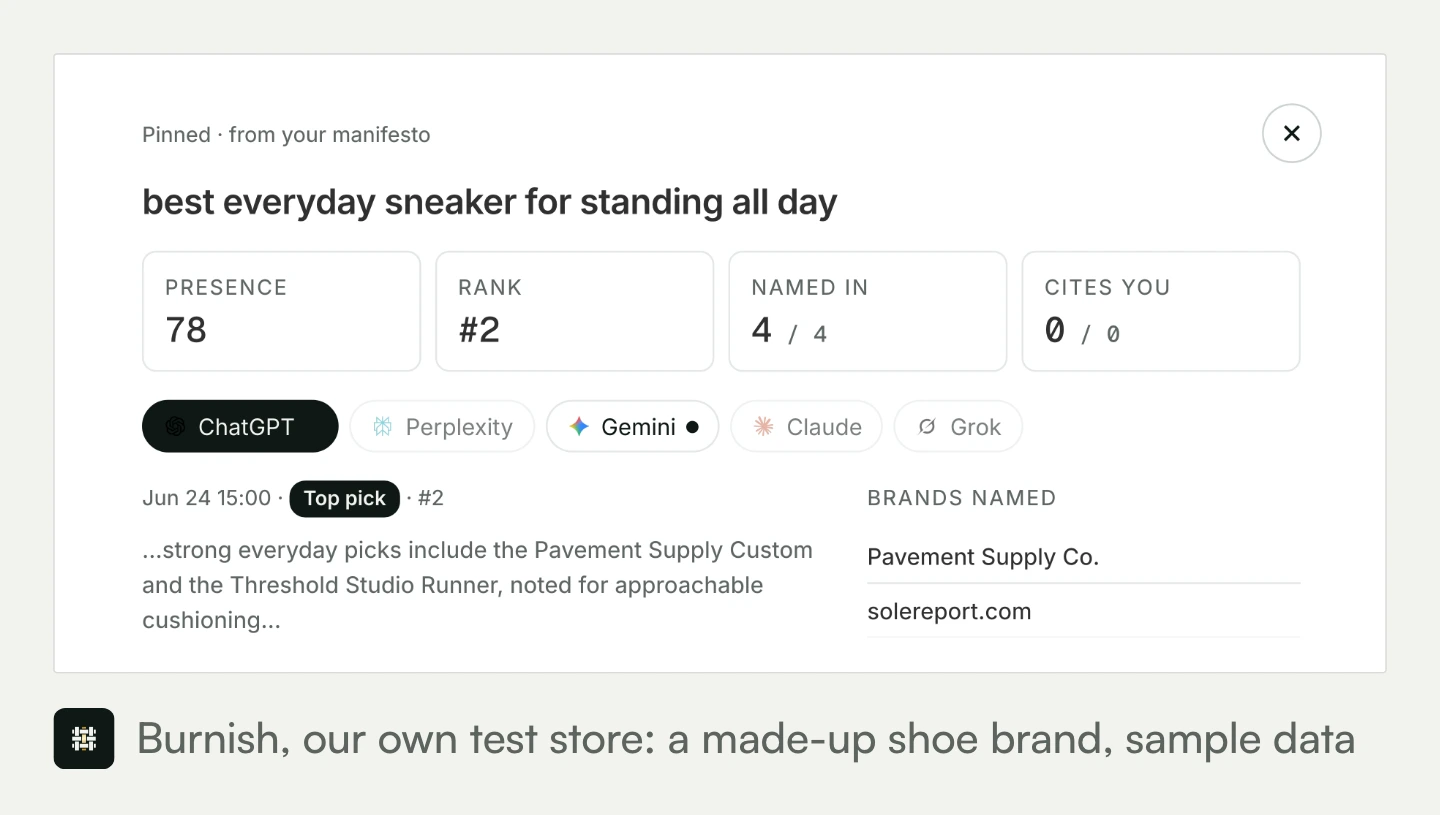
Burnish is a Shopify app that does that checking for you. It asks ChatGPT, Perplexity and Gemini the buyer questions for your products, shows which stores they name, finds what costs you the answer, and drafts the fix to your titles, descriptions and metadata. You approve each change before it publishes.
There is a free plan. Paid plans start at $79 a month. See Burnish on the Shopify App Store.
Questions owners ask
Does selling on ChatGPT cost anything?
Shopify says there are no fees for selling on ChatGPT. You pay only your standard payment processing fees.
Do I need to install the ChatGPT app from the Shopify App Store?
No. Shopify says the ChatGPT Business app is optional and not required for selling on ChatGPT. It lets you claim and manage your business profile, which is a separate step from product discovery.
My store is not in the United States. Can my products still show up?
Yes, if you sell to customers in the United States. Shopify's requirement is that your store sells to US customers; the store itself can be based anywhere.
Do shoppers check out inside ChatGPT?
No. ChatGPT sends shoppers to your own online store checkout, shown in ChatGPT's in-app browser or in a new tab on the web, so your payment methods and checkout settings stay the same.
If I block GPTBot in robots.txt, do my products disappear from ChatGPT?
No. Shopify says blocking AI crawlers only affects open-web discovery. It does not stop Shopify Catalog from sending your product data to the AI channels you have active.
How long does it take to leave ChatGPT if I turn it off?
Shopify says it can take up to 7 days after you turn off Shopify Catalog access before your product data stops being shared.
Burnish Editorial. Prepared with AI assistance and checked against the sources below.
| Source | Note |
|---|---|
| Shopify Help Center: Selling on ChatGPT | Requirements, no-fee line, opt-out steps, 7-day delay, Business app. Read Nov 21, 2026. |
| Shopify Help Center: Shopify Catalog and product discovery | Fields Catalog sends, Channel mapping, robots.txt, agents.md and llms.txt. Read Nov 21, 2026. |
| Shopify Help Center: Shopify agentic storefronts | Active by default for eligible stores; three required policies. Read Nov 21, 2026. |
| Shopify Help Center: Requirements for being included in Shopify Catalog | Ineligibility reasons and fixes (Starter plan or higher, no storefront password). Read Nov 21, 2026. |
| OpenAI Help Center: Shopping with ChatGPT Search | How ChatGPT selects products: structured metadata, third-party content, reviews. Read Nov 21, 2026. |
| Burnish panel, November 19, 2026 | Our own run: the same question to four assistants, answers and cited pages saved. |
Published November 21, 2026, updated November 23, 2026. Every external figure above carries one of these.